The AMDNR 0.3.4 expanded experimental Neural Rendering to handheld Radeon APUs like the ROG Ally and also accelerated processing on RX 7000 and RX 9000 graphics cards. Published on September 27, 2026, the update adds experimental support for the Z1 Extreme, Z2, Radeon 780M, Z2 Extreme, Radeon 890M, and Radeon 880M. In addition, the version brings new kernels, Fast Mode, a revamped interface, Screen GI, and a new launcher.
The update represents a major shift in the reach of the community project. Until now, AMDNR experiments focused primarily on dedicated Radeon GPUs. Now, the RDNA 3 backend is also able to run the network on some APUs, although the developer himself classifies this path as experimental and slow.
The improvements are not restricted to handhelds. A Radeon RX 7800 XT significantly reduced the time required for a network run in isolated tests. At the same time, the RX 9070 XT received faster kernels for RDNA 4.

Reference photo of the ASUS ROG Ally with Ryzen Z1 Extreme. This image does not show AMDNR running; the model appears here because it was used in the early tests of version 0.3.4. Image: TheHDGamer2008/Wikimedia Commons, CC BY-SA 4.0.
AMDNR 0.3.4 brings Neural Rendering to the ROG Ally
The main compatibility breakthrough is in APUs with sufficient resources for the new backend. According to the official release, AMDNR now offers experimental support for the Z1 Extreme, Z2, and Radeon 780M. The list also includes the Z2 Extreme, Radeon 890M, and Radeon 880M.
On the other hand, the project does not include the Z1, Radeon 740M, 760M, 840M, and 860M in the current compatibility. Therefore, the presence of integrated Radeon graphics is not enough to guarantee operation.
To enable processing on these devices, the lmxxf runtime has gained two smaller network sizes. The first works at 640 × 360 pixels. The second uses 1024 × 576 pixels.
In addition, the handheld preset runs the neural model every four frames by default. This strategy reduces inference frequency and, consequently, attempts to control the cost on APUs with lower processing capacity.
The hardware used in the first real-world test was a ROG Ally with a Ryzen Z1 Extreme. ASUS itself states that this processor combines a Zen 4 CPU with RDNA 3 graphics featuring 12 Compute Units and up to 8.6 TFLOPS. However, these figures are device specifications, not AMDNR results.

Official ASUS chart showing the theoretical graphics capability of the ROG Ally with Ryzen Z1 Extreme. The chart is a hardware reference and does not represent an AMDNR benchmark. Image: ASUS ROG.
Shadow of the Tomb Raider ran with Neural Rendering
The first test published inside a game used Shadow of the Tomb Raider. A tester ran the title at 1280 × 720, with XeSS and the Handheld preset.
In this scenario, the runtime used the network at 360p and ran the model every four frames. The developer recorded approximately 62 ms per neural execution and about 29 FPS with Neural Rendering enabled.
This result needs context. This is an individual test on a single ROG Ally unit. Furthermore, the project is still looking for more user reports. Therefore, the 29 FPS should not be treated as guaranteed performance across the entire Z1 Extreme.
The developer also measured just the network outside of the game. In this probe, the ROG Ally recorded 54.7 ms per execution at 360p and 110.9 ms at 576p.
These values do not equal the total frametime of a game. However, they show why the project created smaller network sizes for handheld devices.
RX 7000 starts using more economical levels
The version also modifies behavior on RDNA 3. The lmxxf runtime now automatically approximates certain neural resolutions to more economical predefined levels.
On a Radeon RX 7800 XT, a 1440p test with FSR Quality rendered the game internally at 1706 × 960. Before the change, the network used the 1080p level. Now, the system selects the 900p level.
According to the release, the neural execution time dropped from 73.3 ms to 52.2 ms in this test. However, the developer measured these numbers in the lmxxf probe, outside of a game.
Another scenario used 1080p rendering with the Neural Rendering resolution set to 70%. In this case, switching the 900p level to 720p reduced the time from 52.2 ms to 34.4 ms.
The strategy has a trade-off. Since the network may receive a smaller image, some fine details can become softer. Therefore, the optimization represents a trade-off between cost and fidelity.
A similar relationship between neural resolution and performance appeared in another community project. The DLSSNR-AMD also showed gains when running Neural Rendering before the upscale. However, this project uses a different Vulkan implementation and should not be confused with AMDNR.
RX 9070 XT receives faster kernels
The RX 9000 cards do not use the new tier policy applied to RDNA 3 by default. Even so, AMDNR 0.3.4 also accelerates the lmxxf runtime on these GPUs.
The project incorporated new kernels derived from lmxxf 0.31. On an RX 9070 XT, the 1080p network time dropped from 15.35 ms to 14.08 ms.
At 900p, the measurement went from 10.79 ms to 9.96 ms. At 720p, the result dropped from 6.97 ms to 6.63 ms.
According to the developer, the neural output remained bit-for-bit identical in the benchmark tests. Thus, the optimization reduces processing time without altering the network response in that scenario.

Reference photo of an ASUS TUF Gaming Radeon RX 9070 XT. The image does not belong to the AMDNR benchmark; it illustrates the GPU class used in the version 0.3.4 measurements. Image: 极客湾Geekerwan/Wikimedia Commons, CC BY 3.0.
Again, these numbers measure only the execution of the network outside of the game. Therefore, they do not directly indicate how many FPS an RX 9070 XT will gain during a match.
Fast Mode reduces neural time by about 29%
The update also introduces Fast Mode as an experimental option. When the user enables it, lmxxf runs the network at a resolution level below the one normally chosen.
On an RX 9070 XT, the developer measured approximately 29% less network time at a 1080p setup. On the other hand, the reduction may smooth out fine details.
For this reason, Fast Mode remains disabled by default. The user must explicitly accept the trade-off between speed and fidelity.
The behavior also varies depending on the runtime. Daniel Blanco builds that offer their own Fast Mode may expose the option in the same panel. However, the runtimes distributed alongside this specific release do not include this implementation.
Screen GI adds experimental global illumination
Another novelty appears in AMDNR Screen GI. The feature works as a preview of indirect lighting and ambient occlusion in screen space.
The processing happens before Neural Rendering and the upscaler. Furthermore, the user can activate Screen GI with NR on or off.
In a laboratory test with an RX 9070 XT and 1080p rendering, the High mode consumed approximately 1 ms. However, this value did not come from a full benchmark within a game.
As the method works in screen space, it also has a known limitation. Elements that are outside the current image cannot contribute correctly to the lighting.
For now, Screen GI remains off by default. Therefore, updating AMDNR does not automatically change the lighting of games.
New interface brings together the two runtimes
AMDNR 0.3.4 also redesigns the entire menu. Now, the runtimes by Daniel Blanco and lmxxf share a single control structure.
The Neural tab begins with activation, runtime selection, and a status line. Next, the user finds sections for performance, quality, and image appearance.
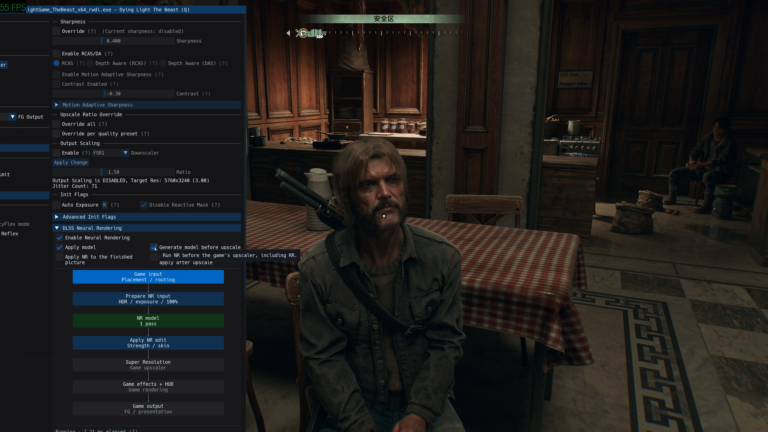
lmxxf has gained options for Network output, Encoding, Residual edge fade, and Game exposure. Additionally, the runtime now responds to character mask controls, Structure intensity, and Character structure.
The update also shows the cost of Neural Rendering in milliseconds when the game and runtime allow this reading. This way, the user can better evaluate the impact of certain settings.
For those using Neural Rendering over the captured screen image, there is another approach. The NeuralScreen has an experimental edition aimed at Radeon, however it works with a different architecture than AMDNR and should not be treated as the same implementation.
AMDNR Launcher simplifies installation
The version also introduces the AMDNR Launcher. The tool manages installation and updates per game, reducing some of the manual work with DLLs and runtimes.
This function gains importance because version 0.3.4 requires three components to remain synchronized: OptiScaler.dll, LmxxfNrRuntime.dll and LmxxfNrRuntime.pak.
The developer himself warns against mixing old and new files. For example, an old version of the runtime may lose controls introduced now. On a handheld, incompatible files can also prevent the loading of new network sizes.
For a fresh installation, the project advises extracting the version package and using the OptiScaler.dll in the format suitable for the game. Those who use Daniel Blanco's runtime also need to install the corresponding files for that runtime.
Fixes reach several games
Beyond the major new features, the update fixes specific issues. Shadow of the Tomb Raider stopped crashing when the upscaler starts on the ROG Ally used in the tests.
Marvel's Midnight Suns also received a fix for a crash related to Daniel Blanco's runtime. Meanwhile, lmxxf gained a path for titles that send frame work with a delay, a situation observed in The Last of Us Part II.
The project also fixed a false incorrect shutdown warning after exiting Forza Horizon 6. Additionally, a glitch in the lmxxf counters could change colors on its own during long sessions; version 0.3.4 clears this data correctly.
These fixes show why compatibility still needs to be handled on a game-by-game basis. Different titles provide data and organize their render queues in distinct ways.
Ray Regeneration reappears for RX 7000
The version also tweaks the FSR Ray Regeneration path. Radeon RX 7000 cards once again receive the option by default, while the previous lineup restricted this path to RDNA 4.
However, offering the option does not guarantee that the driver will accept the initialization. If it fails, AMDNR reports that Ray Regeneration could not start and keeps FSR without the denoiser.
The project also added new stability and filtering controls for this path. At the same time, some previous experimental options were retired after inferior results in the published tests.
DLSS 5 on Radeon remains without official support
Despite the evolution, AMDNR does not represent official support from AMD or NVIDIA for DLSS 5 on Radeon GPUs. The project gathers community components to execute Neural Rendering through paths that do not belong to NVIDIA's official matrix.
Therefore, the results must remain tied to the hardware and settings tested. The numbers for the ROG Ally, RX 7800 XT, and RX 9070 XT cannot be generalized to all AMD GPUs.
Likewise, comparisons with GeForce require caution. A separate test of DLSS 5 on an RTX 5090 measured increases in power consumption and temperature, but that scenario uses different hardware, runtime, and methodology.
The roadmap already points to future expansions. However, planned features should not be treated as part of the current version until the developer publishes a functional implementation.
For now, the AMDNR 0.3.4 concretely expands the project's reach. Neural Rendering arrives experimentally on the ROG Ally and other compatible APUs, the RX 7000 gains a more economical strategy for the network, and the RX 9070 and RX 9070 XT receive faster kernels.
Sources: AMDNR 0.3.4 — official release on GitHub, AMDNR — official repository and documentation and ASUS ROG — official ROG Ally specifications.