
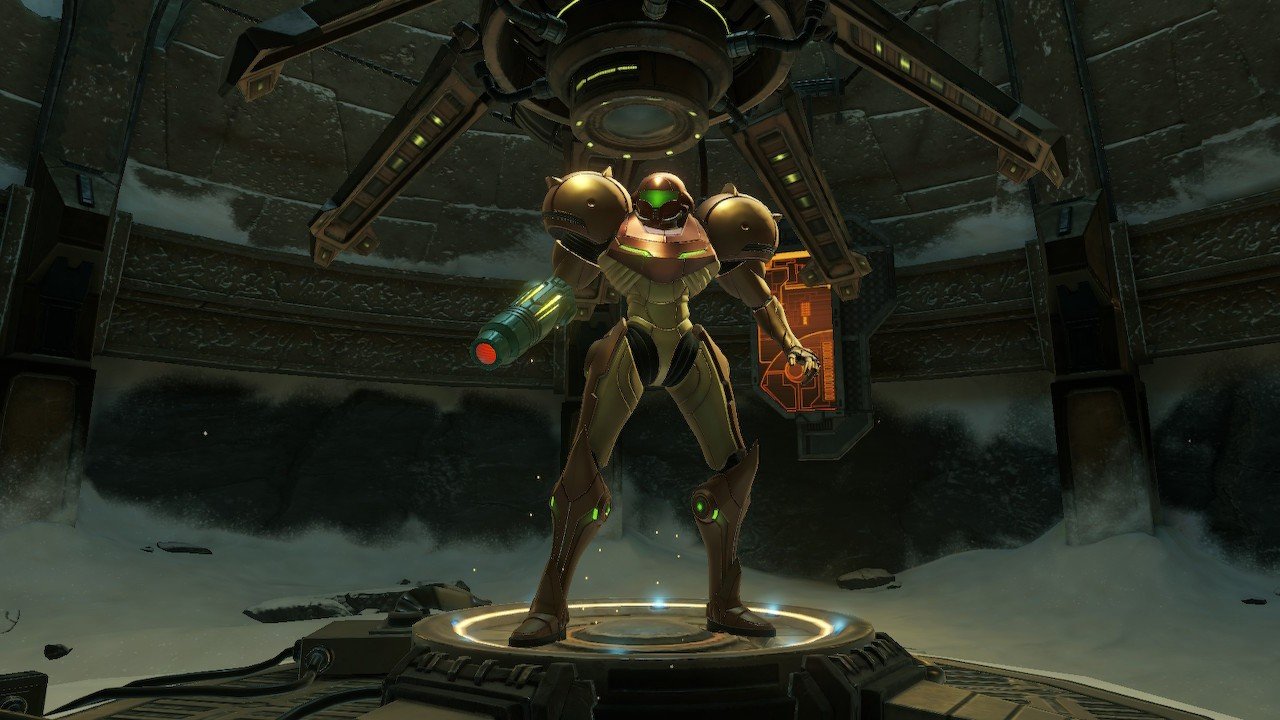
Metroid Prime Port advanced on this Thursday, October 1, 2026, to version 0.7.1 and now allows running the GameCube classic natively on Windows, Linux, and Android. Odrannnn's project compiles the code reconstructed by the PrimeDecomp decompilation for modern platforms and uses Aurora, SDL3, and WebGPU in the presentation layer. Therefore, there is no GameCube emulation during execution.
The project initially drew attention with version 0.5.0, released on September 29, which added save states, skippable cutscenes, a tracker, graphics options, mod support, memory card transfer, and Archipelago integration. However, development progressed rapidly. Versions 0.6.0 and 0.7.0 followed, while the current 0.7.1 adds new features for mods and another fix for doors that could take several seconds to open.
Additionally, the Android version features its own APK for ARM64 and touch controls. The user still needs to provide their own legally acquired copy of Metroid Prime, as no release includes the game's commercial files.
Video by Allves Games compiling the port and recompilation news covered in this article.
Metroid Prime Port runs without emulating the GameCube
The project's base comes from PrimeDecomp, reverse engineering initiative that reconstructs the source code of Metroid Prime. The port specifically uses the North American version GM8E01_00, corresponding to the USA v1.00 release.
Instead of running the original PowerPC instructions inside an emulator, the Metroid Prime Port compiles the decompiled code natively for the target system. Aurora provides part of the platform layer, while SDL3 and WebGPU handle modern services required by the port.
Therefore, the most accurate classification is native port based on decompilation. This is not Dolphin, PrimeHack, interpretation, JIT, or automatic static re-compilation of the original executable.
This model is similar to the Foxhollow from Star Fox Adventures, which also turns a decompiled GameCube codebase into a native program for modern systems.

Start screen captured from the official Metroid Prime Port repository itself.
Version 0.5.0 brought save states, mods and tracker
Version 0.5.0 was one of the project's biggest early leaps. It added eight save state slots, plus an undo slot. On the computer, the player can also use F5 to save a state and F9 to load it.
Another new feature was the integrated tracker. The interface lists items, scans, and visited rooms in each region. In addition, an option allows revealing the entire map without permanently modifying the save.
The port also gained an internal timer geared toward speedruns. Integration with LiveSplit Server allows automatically starting the count on a new file, creating splits when collecting upgrades, and ending the measurement at the credits.
The same release added a mods directory. Each subfolder can replace disk files or specific assets inside the PAKs. The project also accepts texture packs and high-definition replacements.
Finally, 0.5.0 added Discord Rich Presence on desktop and greatly expanded the F1 panel, which currently consolidates pages for controls, rendering, performance, extras, tracker, save states, session, chat, and debugging.
Widescreen and FPS above 60 preserve the simulation
Metroid Prime Port offers 4:3, 16:9 aspect ratio or automatic adaptation to window size. The HUD can occupy the frame's edges, while menus, map, and pause screens receive their own aspect ratio corrections.
The presentation can also exceed 60 FPS. However, the project keeps the game simulation at a fixed frequency. Thus, physics and basic animations do not need to speed up along with the monitor's refresh rate.
Version 0.6.0 expanded this system by introducing interpolation for high-frequency displays. With the limiter turned off, the camera can respond to mouse, twin-stick, or gyroscope on every rendered frame. There are also experimental smoothing options for actors, poses, and particles.
The developer leaves these additional smoothings disabled by default while gathering more tests. Therefore, the feature should not be described as a universal solution already validated on any screen or platform.
Archival trailer of Metroid Prime for GameCube, used as a reference for the base game. The video does not showcase Metroid Prime Port.
Mouse, twin-stick, gyroscope, and remapping
The port greatly expands control options. On PC, it is possible to use a mouse to aim like in a modern FPS. Controls can also work with twin-stick, while compatible devices receive gyro aiming support.
The controls tab allows remapping keyboard, mouse, and gamepad. Each action can be assigned two keys, and the system displays configuration conflicts. There are also presets inspired by the GameCube, modern controllers, and a Southpaw setup.
Gameplay options include Fast Morph, Spring Ball, Toggle Lock-On, and Sticky Charge. All function as optional adjustments; therefore, anyone seeking behavior close to the original version can leave them turned off.
It is also possible to change the first-person field of view, use MSAA, anisotropic filtering, adjust HUD size, and hide the helmet or certain visor effects.
Android receives an ARM64 APK and touch controls
Android is a native platform of the project, rather than running a Windows binary via Winlator or another compatibility layer. Release 0.7.1 provides the file metroid-prime-port-0.7.1-android-arm64.apk for sideload installation.
The current build uses arm64-v8a and specifies Android 9 or higher. Earlier builds, including 0.5.0, did document Android 8+, but this requirement should not be used to describe the current release.
Internally, part of the disk access layer is compiled for aarch64-linux-android. In addition, Android has its own touch overlay, with virtual sticks, triggers, shoulder buttons, and action buttons.
This means that the player does not necessarily depend on a physical gamepad. Even so, traditional controllers remain available for those who prefer an experience closer to a console.
The project does not publish a comprehensive list of validated phones, SoCs, or GPUs. Consequently, there is not enough basis to promise the same performance on any ARM64 device that meets the minimum Android version.
There is no version for iPhone or iPad
Up to version 0.7.1, the publicly distributed platforms are Windows, Linux, and Android. There is no IPA, App Store, or TestFlight for iPhone and iPad.
How to download and install Metroid Prime Port on Windows, Linux, or Android
- Download the package for your platform. On Linux, the project offers three official formats: the .tar.gz package, AppImage, and Flatpak. All the buttons below automatically point to the latest public release.
DOWNLOAD UPDATED METROID PRIME PORT PC
DOWNLOAD UPDATED METROID PRIME PORT LINUX
DOWNLOAD METROID PRIME PORT LINUX APPIMAGE UPDATED
DOWNLOAD METROID PRIME PORT LINUX FLATPAK UPDATED
DOWNLOAD METROID PRIME PORT ANDROID UPDATED
- Install or extract the package. On Windows, extract the ZIP; the project reports a dependency on Microsoft Visual C++ Redistributable. On Linux, extract the .tar.gz, or grant execution permission to the AppImage with chmod +x, or install the Flatpak bundle. On Android, open the APK and authorize sideloading when the system prompts.
- Open the port and select your game image. On the first run, choose an image of your own legally acquired copy of Metroid Prime USA v1.00, code GM8E01, disc 0 and revision 0. The project does not include the game.
- Let the port memorize the disc. The choice is saved in the settings. On Android, the first selection is copied to the application storage, avoiding asking for access again in future runs.
There is also no official native release for macOS in this build series. Therefore, any eventual execution on Apple systems through a compatibility layer should not be confused with native support documented by the project.
Similarly, there are no official Metal requirements, minimum iOS version, or tested Apple hardware. If an iOS version appears later, it will represent its own delta for the radar.
Port requires your own copy of Metroid Prime
No build includes ROM, ISO, maps, audio, or other commercial game assets. The user must provide their own legally obtained disc image.
The port currently requires Metroid Prime USA v1.00, code GM8E01, disc 0 and revision 0. On first launch, the program may open a picker to locate this image.
On Android, the chosen file is copied to the application's private storage. This way, subsequent launches do not depend again on the temporary permission granted by the document picker.
This requirement also differentiates the project from an independent distribution of the game. The repository provides the port layer, but does not redistribute commercial content from Nintendo and Retro Studios.
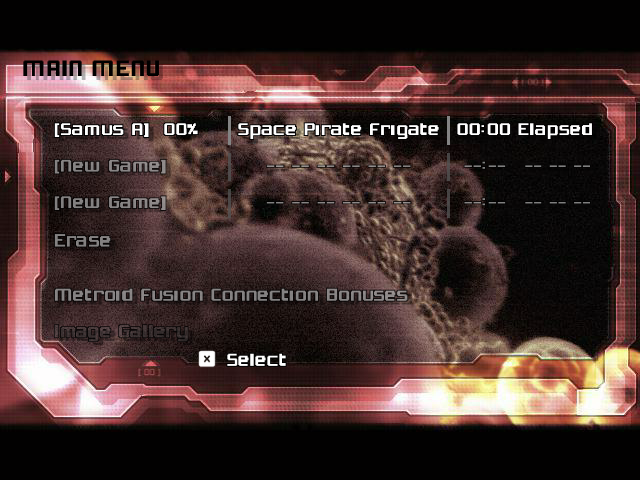
Save menu documented in the official Metroid Prime Port repository.
Randomizer and Archipelago work on all three platforms
The integrated randomizer works on Linux, Windows, and Android. It alters item distribution through a seed file and maintains separate saves for different configurations.
Archipelago Multiworld also integrates the port. The user can enter server, slot, and password directly through the Session page of the F1 interface. The system keeps checks made offline and sends them when the connection returns.
Version 0.5.0 corrected the format of messages sent to the server, allowing communication with real servers. Then, 0.6.0 corrected the models and cutscenes displayed on pickups received by Archipelago and added support for compressed WebSocket messages.
Meanwhile, 0.7.0 added specific scan text for randomized items, hints on the Artifact Temple totems, and white dots on the map for pickups not yet collected.
Version 0.7.0 also sped up slow doors
An issue with the port could cause some doors to large rooms to remain closed for 20 seconds or more during the first access. The investigation showed that video waits, such as VSync or a busy GPU, were consuming part of the time reserved for the loader.
Version 0.7.0 changed this time division to ensure that loading receives its share of processing. Thus, the project reduces situations where a door apparently froze while waiting for a large room to get ready.
In addition, 0.7.0 introduced the variable MP_MEM1_MB, which allows increasing the game's memory arena in installations with very heavy mod models.
Metroid Prime Port 0.7.1 fixes another cause of slow doors
Version 0.7.1, published on October 1st, found a second source for doors that could remain closed for several seconds, in some cases reaching about 25 seconds.
The problem involved outdoor areas. The game unloaded the sky when no active room needed this resource. Upon re-entering an outdoor area, the sky loading could delay the door release.
Now, the port keeps the sky loaded. The change complements the fix made in version 0.7.0. The developer also added extra information to the log to help diagnose any remaining wait.
0.7.1 also adds support for PBR materials in models added by mods. These materials can utilize metalness, roughness, normal maps, and emissive maps. However, the original commercial game does not use this function, so the default graphics remain unchanged.
Mods have become larger and skinning has become faster
Version 0.6.0 also removed several limitations for mods. Textures larger than 4 MB now load, assets that do not exist within the original PAKs can be added, and models are no longer limited to 65,535 vertices.
The skinning code for animated models received another optimization. According to the release, the new implementation performs this step approximately 3.5 times faster while maintaining the same result.
Furthermore, very large animated models no longer cause a crash that existed in previous builds. These changes make the port more interesting not only for preservation, but also for more ambitious modding projects.
GameCube and Dolphin saves can be transferred
Since version 0.5.0, the port allows importing and exporting files .gci and full memory card images. The documentation explicitly cites the possibility of transferring saves directly to and from Dolphin.
Thus, players who already have progress on a preserved copy of the GameCube can transport their data to the port, provided they use compatible files.
The project also offers eight save states, but they do not necessarily replace the traditional save system. The two mechanisms coexist and serve different uses.
Tests still do not mean full compatibility
In version 0.7.1, the port's 23 automated tests pass. The Linux binary, the AppImage, and the Flatpak were built and checked by the developer, while the CI generated the Windows package.
However, the release itself notes limitations in validation. The author had not yet tested the execution of version 0.7.1 on Windows and Android on real hardware, nor reproduced the fix for slow ports on a machine that originally presented the problem.
Therefore, “23 approved tests” does not equate to stating that the entire campaign was manually validated on all systems, GPUs, and Android devices.
This caution is especially important because the project evolved very quickly. Version 0.5.0 was released on September 29, 0.6.0 and 0.7.0 arrived on September 30, and 0.7.1 appeared on October 1.
Port expands Metroid Prime preservation
The Metroid Prime Port transforms the decompilation work into an application usable by players. While PrimeDecomp seeks to reconstruct the original code with precision, the port adds the necessary layer to execute this code on modern systems.
This strategy also opens the door for widescreen, modern input, high refresh rates, touch on Android, mods, randomizer, Archipelago, and speedrun tools without relying on a GameCube virtual environment.
At the same time, the project remains separate from Nintendo's commercial versions. Metroid Prime Remastered remains an official product for Nintendo Switch, while this port is a community initiative not affiliated with Nintendo or Retro Studios.
With public builds for Linux, Windows, and Android, the main milestone is already established: Metroid Prime can now run as a native application on these systems from its decompiled code, provided the user supplies the data from their own compatible copy of the game.
Sources: MetroidPrimePort — official repository; Metroid Prime Port 0.7.1 — official release; release 0.7.0; release 0.6.0; release 0.5.0; PrimeDecomp/prime.
Pingback: Mario Wonder nativo roda perto de 60 FPS no Windows
Pingback: Daytona USA nativo: recompilação chega a Windows, Linux e macOS
Pingback: WrestleMania port nativo ganha 4 jogadores e Android
Pingback: Super Mario Sunshine PC ganha port nativo com 60 FPS
Pingback: ICO port nativo: PC, Android e texturas HD
Pingback: Metroid Prime recompilação nativa no Mac e Quest 3
Pingback: Super Metroid 3DS 0.5.0 melhora FPS no 3DS e 2DS
Pingback: Metroid Prime Port 0.20.0 ganha Mac e melhorias
Pingback: Tekken 3 Expanded 1.2 chega ao Android com 18 lutadores