
The DLSS5-Feeder 1.17.0-beta.3 fixes a major incompatibility between old versions of the RenoDX DLSS 5 add-on and recent NVIDIA drivers. The developer released the new beta on September 25, 2026, after confirming that RenoDX v4.7 could fail to create and execute Feature 18 on 616.64 series drivers or higher, even when the rest of the installation seemingly worked.
In addition, the update brings the experimental Output Stabiliser to all 64-bit paths. The feature, which had debuted in the helper intended for 32-bit games, now works across Direct3D 12, Direct3D 11, Vulkan, and OpenGL transports.
The release also changes the automatic installer. Instead of keeping an old version of RenoDX DLSS 5 stuck in the cache, the script now queries the RHI repository to locate the newest available add-on and neural model, as well as separating the cache per release.

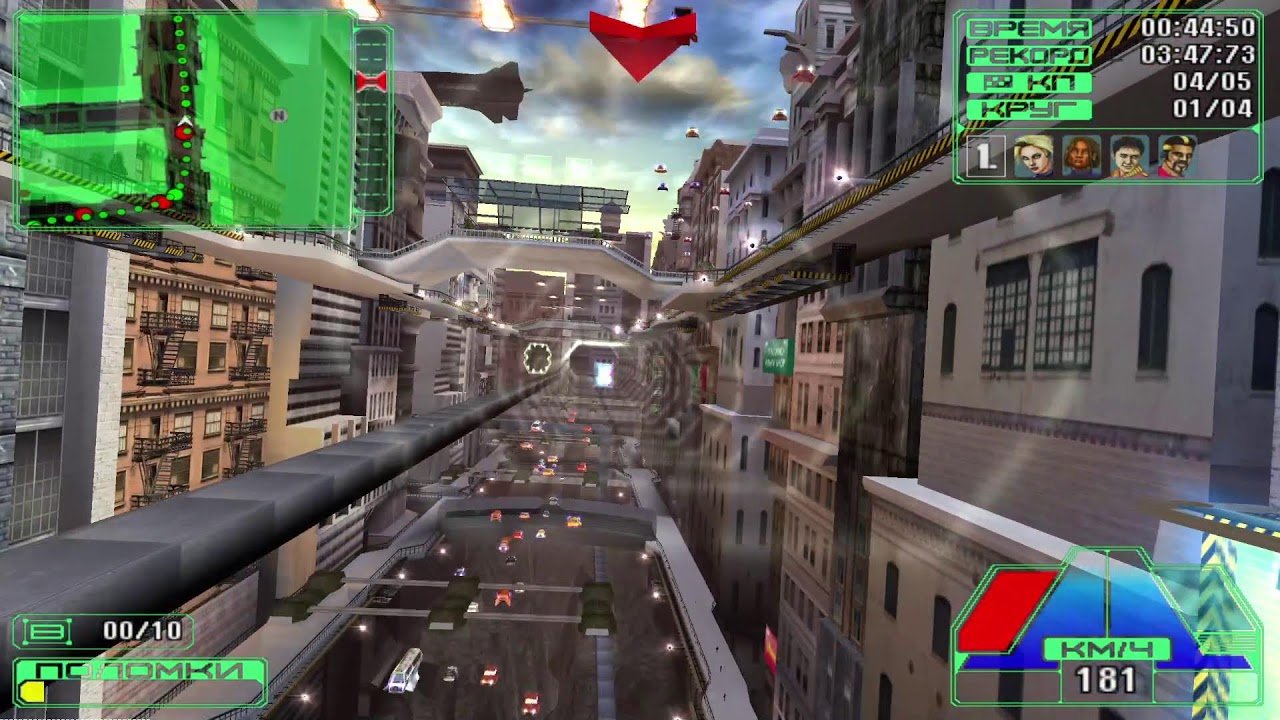
Independent example of DLSS 5 working in Beam Breakers through a setup with ReShade and DLSS5-Feeder. The image does not represent a specific test of the beta.3. Image: csekevilmos/ModDB.
DLSS5-Feeder 1.17.0-beta.3 fixes an issue with recent NVIDIA drivers
The developer detailed the changes in the official DLSS5-Feeder release on GitHub.
The most important issue involves the RenoDX DLSS 5 add-on. Previous installations frequently used version v4.7, including through earlier versions of the automated installation script.
However, this combination began to fail with newer NVIDIA drivers.
According to tests published by the project, RenoDX v4.7 achieved 0 successful evaluations out of 300 attempts on the NVIDIA 617.14 driver.
Newer versions of the add-on, however, completed all self-test evaluations.
| RenoDX DLSS 5 | Driver | Self-test |
|---|---|---|
| v4.7 | 617.14 | 0/300 |
| v6.1.0 | 617.14 | 300/300 |
| v7.0.0-rc8 | 617.14 | 300/300 |
| v8.0.1 beta | 617.14 | 300/300 |
The test used a GeForce RTX 5090 and the 617.14 driver. Therefore, these numbers demonstrate the difference within this specific configuration and do not constitute a general performance benchmark.
The result shows, however, that modern versions of RenoDX were able to create and evaluate Feature 18 where v4.7 failed completely.
What is Feature 18 and why could an installation look normal?
The DLSS5-Feeder creates a DLSS call that the game originally wouldn't make. This way, the Neural Rendering add-on can intercept this evaluation and insert neural processing.
The project identifies the Neural Rendering feature as Feature 18.
Because of this, an installation can load ReShade, compile shaders, and even run conventional DLSS without Neural Rendering actually working.
This scenario helps explain cases where the user updated the driver and noticed little to no visual transformation, even though the main files still appeared to be loaded.
In the problematic combination, DLSS could continue providing its antialiasing step while the creation of Feature 18 failed.
Thus, merely observing the presence of ReShade or the add-on does not guarantee that the neural network is actually running.
Feeder also confused modern versions of RenoDX with the old v4.7
The incompatibility revealed another issue.
Recent versions of RenoDX DLSS 5 retain some internal markers that also exist in v4.7. As a consequence, DLSS5-Feeder could identify a modern version as if it were the old one.
This generated incorrect warnings about incompatibility.
Beta.3 changes the identification system. Now, the program looks for the real add-on version banner and uses the compilation date as a fallback when the banner does not exist.
Additionally, both 64-bit binaries now correctly recognize versions with pre-release suffixes.
For example, the system can now interpret v7.0.0-rc8 without reducing this identification to a generic or old version.
Driver 616.64 becomes an important point for legacy RenoDX
The updated documentation highlights a practical change for those using recent drivers.
The previous installer could download or reuse RenoDX DLSS 5 v4.70. However, the project notes that this version fails on the tested path starting from driver 616.64.
Therefore, the recommendation is no longer just to update DLSS5-Feeder.
It is also important to check which version of the RenoDX neural consumer is installed.
This becomes especially relevant in older installations that worked for weeks and started failing after an NVIDIA driver update.

Another independent comparison shows the type of visual transformation that a working DLSS5-Feeder setup can produce. This capture predates beta.3 and does not measure driver correction. Image: csekevilmos/ModDB.
Installer now checks for the latest RenoDX and neural model
Beta.3 also modifies the script Install-DLSS5Feeder.ps1.
Previously, the automatic installer worked with a fixed version of RenoDX DLSS 5. In addition, the caching system could indefinitely reuse the first copy it had downloaded.
Thus, a user could run the installer again months later and still receive the same old files stored locally.
The new implementation queries the RHI repository on every run to locate the latest releases of renodx-dlss5-* and dlssnr-*.
During tests of this version, the script encountered RenoDX 7.0.0-rc8 and the model 310.8.Lecram.
In addition, the cache now separates files by release.
When there is no connection, the installer looks for the most recent version already stored in the cache.
The developer specifically tested the download step against the live RHI repository, then repeated the process using the cache, and finally executed this step offline.
However, the beta.3 release notes add a caveat: the developer has not yet run a complete end-to-end installer cycle in this release.
Output Stabiliser arrives for 64-bit games
The second major new feature involves the experimental temporal stabiliser.
In beta.2, this feature first appeared in the helper used by 32-bit games.
Now, the beta.3 ports the same compute pass to all 64-bit transports supported by the add-on:
- Direct3D 12: uses the game's own device;
- Direct3D 11;
- Vulkan;
- OpenGL.
The system executes a compute pass after the neural evaluation.
When the original image remains virtually unchanged between two moments, the stabilizer can preserve part of the previous neural interpretation. On the other hand, when the input changes above the defined threshold, it follows the new output produced by the model.
The goal is to reduce unwanted temporal changes in regions that should remain visually stable.
Hold strength and Change tolerance control the stabilizer
The interface maintains two main controls.
Hold strength defines how much of the previous interpretation the system attempts to preserve. A value of zero keeps the feature turned off, which remains the default behavior.
Already Change tolerance determines how much difference must appear in the original image before the stabilizer abandons the held output and fully accepts the new neural interpretation.
Thus, the user can adjust the balance between temporal stability and the ability to track scene changes.
However, the feature remains experimental. Excessive retention can create its own problems in scenes with rapid motion or changes.
64-bit stabilizer has not yet received gameplay validation
This point is important for correctly interpreting the update.
The project confirms that the stabilizer compiles on 64-bit transports and that the implementation is present in beta.3.
However, the developer states that the 64-bit version of the Output Stabiliser has not yet been executed inside a game in this release.
The practical test published previously continues to be that of the 32-bit helper implementation.
Therefore, there is still no basis to claim that the feature reduces a certain percentage of flicker, improves frametimes, or resolves specific temporal instabilities in 64-bit games.
There are also no new, specific tests in PCSX2, RPCS3, Dolphin, or other emulators.

Beam Breakers is a recent example of an older game running with a chain that includes ReShade and DLSS5-Feeder. The footage shows gameplay, but does not constitute a test of the new 64-bit stabilizer. Image: csekevilmos/ModDB.
The change allows testing the stabilizer in more games and emulators
Despite the lack of specific validation, 64-bit support greatly broadens the testing field.
Many modern games use 64-bit executables. Furthermore, emulators like PCSX2, RPCS3, and Dolphin also have modern 64-bit builds.
Therefore, the new implementation creates the technical possibility of testing the stabilizer in the D3D11, D3D12, and Vulkan pipelines used by these programs.
This does not mean the developer has confirmed compatibility or benefit in every emulator.
In practice, beta.3 simply removes the limitation that kept the stabilizer tied to the special 32-bit games path.
RTX 20, 30 and 40 continue to require special attention
The RenoDX update does not resolve another important limitation of Neural Rendering.
According to the official notes, the signed NVIDIA DLL nvngx_dlssnr.dll 310.8.0 creates the neural feature in the documented scenario only on GeForce RTX 50 Series GPUs.
The modified variant 310.8.Lecram, which the installer now locates in the RHI repository, was also validated by the developer only on an RTX 50 Series.
On RTX 20, RTX 30, or RTX 40, conventional DLSS may initialize while Neural Rendering fails.
In this case, the log may show:
feature 18 create failed with 0xbad00001
Thus, simply swapping RenoDX v4.7 for a new version does not automatically turn the neural runtime intended for the RTX 50 Series into a functional implementation on previous generations.
The project advises users of these cards to use a modified version of nvngx_dlssnr.dll prepared specifically for the corresponding architecture.
RTX 5090 completed 300 evaluations with different combinations
The main validation of beta.3 used an RTX 5090 with NVIDIA driver 617.14.
The helper completed 300 out of 300 evaluations with Feature 18 using RenoDX 7.0.0-rc8 and the signed NVIDIA model.
Additionally, the same version of RenoDX completed 300 out of 300 evaluations with the 310.8.Lecram variant.
RenoDX v8.0.1 also completed all 300 evaluations.
Separately, the version documentation confirms that RenoDX v6.1.0 also passed the 300-evaluation self-test.
Meanwhile, the older v4.7 remained at zero out of 300 on the same driver.
These results provide strong evidence for the compatibility fix. However, they measure the creation and evaluation of the neural feature in the self-test, not FPS or visual quality inside a game.
How to verify if Neural Rendering is actually working?
The new version makes this distinction even more important.
The project itself offers a self-test in the helper. When the configuration works correctly, it can complete the 300 evaluations with Feature 18 created.
In addition, the DLSS5-Feeder log records the initialization and execution steps.
This helps separate three different scenarios:
- ReShade loaded, but the Feeder did not start correctly;
- DLSS worked, but Feature 18 was not created;
- DLSS and Neural Rendering are actually being evaluated.
This distinction is especially useful after a driver update, as the interface may look normal even when the neural step fails.
DLSS5-Feeder continues to support games without native DLSS
The core objective of the project remains the same.
The DLSS 5 add-on normally expects to find DLSS calls made by the game itself. When a title lacks DLSS, those calls simply do not exist.
DLSS5-Feeder creates this contract artificially from the frame, depth buffer, and motion vectors available through ReShade.
Next, it executes a real DLAA evaluation. The neural consumer intercepts this evaluation and inserts Neural Rendering.
Because of this, the project manages to bring this pipeline to D3D11, D3D12, Vulkan, and OpenGL games that do not natively implement DLSS.
Paths for 32-bit titles use a 64-bit helper, since the required NGX components do not have a 32-bit implementation.
Not every 64-bit game needs the DLSS5-Feeder anymore
The current documentation also brings an important distinction for new installations.
In certain 64-bit DirectX 9, 11, or 12 games that already make their own DLSS calls, there is now a simpler route through the add-on renodx-dlss.
In these cases, the add-on itself can take advantage of existing calls and the DLSS5-Feeder may become unnecessary.
However, the Feeder remains relevant when the game does not have its own DLSS.
Furthermore, the project remains necessary in cases such as 32-bit games, Vulkan, and certain DirectX 9 configurations that rely on the temporal contract created by ReShade.
Official file has SHA-256 published by the developer
The project also reinforced its warnings against fake copies.
According to the developer, the only official source for DLSS5-Feeder packages continues to be the GitHub releases page itself.
For version 1.17.0-beta.3, the published SHA-256 for the official ZIP is:
7DB0D8C2B29DE702DEAAFCFEA9112DC15A35D62BB15E6FE0C982C150EF8D2392
The repository also warns against malicious sites and lookalike copies.
Furthermore, it is important to differentiate the official package from the automatic installation script. The project features an one-line PowerShell installation script, but does not distribute a standalone executable installer.
Is it worth testing DLSS5-Feeder 1.17.0-beta.3?
For those who already use DLSS5-Feeder, especially after updating the NVIDIA driver, beta.3 brings changes directly related to Neural Rendering reliability.
Testing with the 617.14 driver shows a clear difference between RenoDX v4.7 and modern versions.
Thus, users who notice DLSS working without a visible neural transformation have a concrete reason to check the add-on version.
As for the Output Stabiliser 64-bit, it deserves a more cautious evaluation.
The implementation now covers D3D12, D3D11, Vulkan, and OpenGL, but has not yet received published validation within a 64-bit game in this release.
Therefore, it works better as an experimental feature for testing than as a proven fix for flicker or temporal instability.
What does beta.3 actually change?
The main fix resolves a concrete incompatibility between the old RenoDX DLSS 5 and recent NVIDIA drivers.
In addition, the Feeder now correctly identifies new versions of the add-on and avoids confusing them with v4.7.
The installer also no longer depends on a fixed RenoDX and now looks for the latest versions in the RHI repository, with a separate cache per release.
Meanwhile, the Output Stabiliser is no longer exclusive to the 32-bit path and now exists across all four 64-bit transports.
The most solid result of the update is in the self-test: on driver 617.14 and an RTX 5090, RenoDX versions 6.1, 7.0.0-rc8, and 8.0.1 successfully created and evaluated Neural Rendering, whereas v4.7 failed.
As for the visual or temporal gains of the new stabilizer in games and emulators, they still depend on practical tests.
Sources: DLSS5-Feeder — official releases on GitHub | DLSS5-Feeder — official repository and documentation | NewReleases — mirrored changelog of v1.17.0-beta.3 | DLSS 5 Neural Remaster — independent example using DLSS5-Feeder.
Pingback: DLSS 5 Autopilot 2.0.7 melhora diagnostico e FG