The classics Miki's World 1 and 2, originally released for Java mobile phones, have received a native Windows port. Thus, the project brings together both Sumea platform games into a single program, featuring modern controls, graphical improvements, and save support. In addition, version 1.2.0 arrived on October 10, 2026 with important new features.
Developed by TwistZero, the port allows you to play Miki's World 1: The Lost Tiara and Miki's World 2: The Storm Master without relying on a conventional J2ME emulator. However, the program does not include the commercial game files. Therefore, the user must provide their own JAR files.
Miki's World 1 and 2 get an expanded screen in version 1.2.0
The main new feature in version 1.2.0 is the expanded view mode. Now, the player can see a larger area of the stages, instead of being limited to the small framing of old mobile phones.
To this end, the developer implemented an option called Extended View. Thus, it allows you to expand the image according to the window size and adjust the zoom using the + and - keys.
According to the official documentation, the new feature does not modify the physics, movements, or core mechanics of the game. Instead, the system renders additional parts of the scenery around the originally visible area.
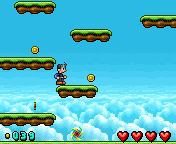
One of the secret rooms in Miki's World 1 in the original Java mobile version. Historical image, not a demonstration of port 1.2.0. Source: MobyGames.
The magnification has limitations. For example, since the original maps have a reduced width, the sides may display black areas on very wide windows. In addition, menus and story cutscenes continue to use the traditional framing.
Even so, the feature offers a different way to view the games on modern monitors, preserving the original logic described by the developer.
Miki's World 1 and 2: mod support on PC
Another new feature in version 1.2.0 is support for player-created modifications. The developer allows replacing images, characters, background elements, and audio files with custom content.
Therefore, mods are organized into their own folders and can be activated via the Options menu. In addition, the project includes simple examples to demonstrate how the system works.
During gameplay, the F5 key allows reloading modified images and sounds. Thus, creators can preview certain changes without needing to restart the program.
On the other hand, deeper modifications require extra care. The developer explains that mods capable of altering how the game works may use separate saves. Furthermore, the documentation provides guidelines on file formats and sizes.
CRT and LCD filters recreate the look of Nokia cell phones
Prior to version 1.2.0, the 1.1.0 update had already added new graphical options for Miki's World 1 and 2. Among them are CRT, LCD, xBRZ, ScaleFX filters, and other image scaling methods.
The LCD filter attempts to reproduce characteristics of the small cell phone screens of the era. Meanwhile, the CRT adds effects associated with old televisions, such as scanlines and image curvature.
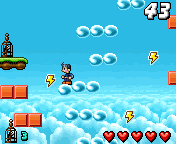
Final battle of Miki's World: The Lost Tiara on the original mobile phone. The PC port offers optional filters to alter the image presentation. Source: MobyGames.
Another option adds visual trails similar to the persistence effect of old LCD screens. Additionally, players can keep the pixels sharp or use filters that smooth out the edges of the drawings.
These features are optional. Therefore, those who prefer the original appearance can continue using the traditional look of the games.
Both games were rebuilt to run on PC
The project was born from a decompilation work of the original games. According to the author, the logic of Miki's World 1 and Miki's World 2 was reconstructed and compared with the operation of the J2ME versions.
In the documentation, TwistZero states that it performed 17 execution comparisons for the first game and 20 for the second, obtaining results equivalent to the originals in these tests.
In addition, the developer claims to have compared rendered frames, scenery logic, menus, scoring systems, and audio files. However, these results are reported by the project itself and do not represent an independent audit of Allves Games.
The port uses C#/.NET 8 and raylib to run the games on Windows. In addition, the program includes modern control and presentation options while retaining the core features of the original titles.
Miki's World 1 and 2: controls and saves
Players can use a keyboard or compatible controllers. In addition, the program allows you to remap commands, configure buttons, and use the mouse to navigate through the menus.
Additionally, the port offers borderless fullscreen, volume adjustments, compatible vibration, and different movement modes.
Presentation image included in the Miki's World PC Collection project. Source: TwistZero's official GitHub repository.
Those who wish to explore additional features can also access a debug menu via the F3 key. Thus, it allows you to view collision areas, activate infinite lives, and test specific parts of the games.
Saves are stored separately for each title. This way, the progress and scores of one game do not overwrite the records of the other.
How to download and install Miki's World 1 and 2 on Windows
The port provides public files for Windows. However, it does not distribute the commercial assets of the original games, which continue to belong to their respective rights holders.
To run the titles, you need to own your own legally acquired copies of the two original files: MikisWorld.jar and MikisWorld2.jar.
- Download the updated package for Windows using one of the buttons below. The first offers the standalone executable; the second provides a ZIP file of version 1.2.0 with sample mods.
DOWNLOAD UPDATED MIKI'S WORLD PORT WINDOWS
DOWNLOAD UPDATED MIKI'S WORLD PORT WINDOWS WITH MODS
- If you chose the ZIP, extract the contents to a folder. If you downloaded the standalone executable, place the file in a folder of your choice.
- Next to MikisWorldCollection.exe, create a folder named JAR.
- Place the original files MikisWorld.jar and MikisWorld2.jar inside this folder. The program requires both files.
- Run MikisWorldCollection.exe and choose which of the games you want to start.
- Open Options to configure controls, filters, resolution, LCD effects and the enlarged view mode.
- If you want to use mods, place the files in the modifications folder indicated by the documentation and activate them via the Options → Mods menu.
The program allows you to play without needing to start a separate Java emulator. However, having the executable does not eliminate the need for the original game files.
The documentation also states that settings and saves are stored in %APPDATA%\MikisWorld, including separate files for both titles.
Mobile classics gain new life on computers
Miki's World is a platform game series created by Sumea in the early 2000s. In addition, the games feature colorful scenery, clouds, floating platforms, and item collection challenges.
Now, the Windows port brings both titles together in a single program, without abandoning the elements that defined the original versions.
The work accompanies other initiatives for the preservation and adaptation of old games for modern systems. Among them are the native port of SNES Theme Park for Windows and the Super Metroid project in C# for PC and Android.
With version 1.2.0, Miki's World PC Collection expands customization possibilities and improves the visualization of scenarios. However, the project remains an independent initiative, with no official link to the owners of the original games.
Sources: Official Miki's World PC Collection repository; Release 1.2.0; Release 1.1.0; Official changelog; MobyGames — Miki's World 1; MobyGames — Miki's World 2.