Sonic and the Black Knight, an adventure released for Wii in 2009, received a native recompilation project for Windows called BlackKnightRecomp. The work by yunophilia allows the use of conventional controllers, keyboard, and mouse instead of Wii Remote gestures. Furthermore, the author documented new Battle Mode tests at 30 and 60 FPS on October 18, 2026.
The source code is public, but the Releases tab does not yet offer a ready-to-use executable. To play, it is necessary to compile the project and provide the files from your own edition RENE8P. On October 18, the developer added an installer that eliminates the mandatory use of DolphinTool. No commercial game data is distributed.
How the Black Knight port adapts the controls
The proposal converts the game's PowerPC code to C++ and compiles it for Windows x64. At the same time, the project maintains a runtime that reproduces the necessary Wii hardware and services. Parts of this framework are based on Dolphin's work, including audio and graphical behavior.
Thus, sword movements can be triggered by buttons and analog sticks. On an XInput controller, A jumps, X strikes, and RB blocks or interacts. Additionally, the right analog stick helps direct slashes and moves the pointer in menus.
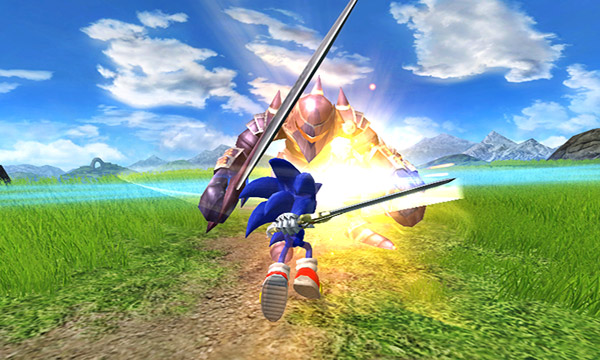
On the keyboard, WASD moves Sonic, Space jumps, and J or the left mouse button triggers the sword. In turn, Shift or the right mouse button handles defense. The configuration options allow changing the controls, but adjusting controls for different types of stages still appears as pending work.
Black Knight at 60 FPS: what was tested
In the October 18 log, the author compared automated two-player matches across the seven Battle Mode arenas. According to this test, the timer maintained approximately 99.9% of real time at both frame rates. Additionally, movement speeds and jump counts remained similar.
Later, the verification commit with full settings recorded 34 automated scripts, with audio and 3x internal resolution. The author's report points to gameplay samples above 58.3 FPS. However, stage loading showed brief drops to around 56 to 57 FPS.
These numbers describe the developer's tests. Therefore, they do not guarantee the same performance on any PC, nor do they prove an entire campaign played without interruptions. There was no independent benchmark by this report.
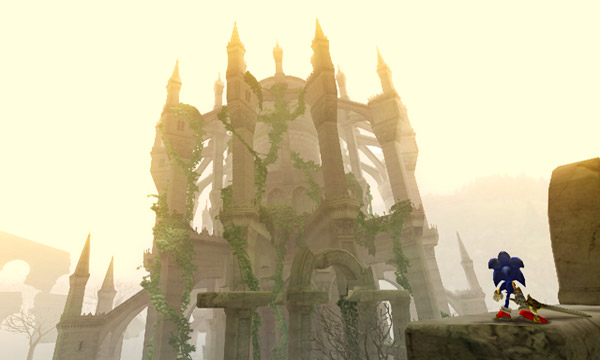
In addition, the progress log reports comparisons of 27 missions, covering 13 locations, stage types, and bosses. However, there are small differences in the height and duration of a full jump between 30 and 60 FPS. The author also investigates a speed difference in a block of values possibly linked to a visual effect.
Widescreen and graphics settings
The project uses Direct3D 11 for graphics and XAudio2 for audio output. In addition, it offers 16:9 widescreen, internal resolution scaling, anisotropic filtering, and disk shader cache. The default configuration cited by the author uses 3x internal scaling, close to 1080p.
There is also support for texture packs in Dolphin format, provided the user supplies the pack separately. On the other hand, the repository does not include an HD texture set for the game. The existence of this option does not mean the visuals were remastered in all scenarios.
The file config.ini concentrates resolution, fullscreen, VSync, language, and button mapping. This way, the player can select frame_rate=30 or frame_rate=60 after preparing the installation. The result remains dependent on the hardware and the experimental state of the project.
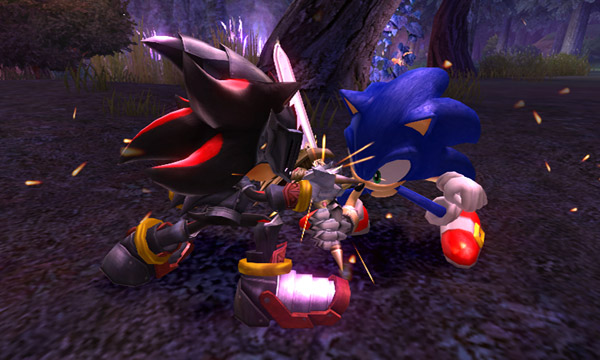
Furthermore, additional controllers can take over the Battle Mode players, while the keyboard controls the first player. The recent test highlighted by the author used two automated participants. Therefore, it should not be presented as an independent validation of all controller combinations or online matches.
How to set up Black Knight on Windows
1. Check the game version and the tools
First, have an image of your own PAL Wii edition, identified as RENE8P. The new installer accepts ISO, RVZ, WIA, and WBFS. To compile, the guide requires 64-bit Windows 10+, Visual Studio 2022 or later with C++ and Clang, CMake 3.21+, Ninja, and Python 3.10+. The initial setup downloads the pre-compiled library nod DolphinTool is no longer mandatory.
2. Access the code and official instructions
Next, consult the repository and the official instructions. The button below leads to the source code and the compilation guide. The Releases tab does not offer a ready-to-use executable; therefore, the link does not download the game.
3. Generate and compile the project
In the Visual Studio Developer PowerShell, run cmake --preset windows-clang and cmake --build --preset windows-clang. This first build generates the utility bkr_install. To prepare the data, run out/bkr_install path/to/your/disc.iso with the path to your own image. Then, run python tools/build_generated.py and again cmake --build --preset windows-clang.
The proprietary installer extracts the files to game/extracted/DATA. Thus, it is not necessary to install DolphinTool in the updated workflow. The old extraction with DolphinTool remains compatible as an alternative, according to the author's README.
4. Start and adjust the options
Finally, the build generates out/BlackKnightRecomp.exe. If the data is not yet installed, the first run prompts for your legitimate Wii image and automatically extracts the content to game/extracted/. According to the developer, the process takes about a minute and occupies approximately 3.5 GB. Afterwards, the image is not needed in this workflow. Those who used DolphinTool before can keep the old installation, with the ISO in game/ for raw reads. We have not performed an independent test of the new installer.
The documented playable target is Windows. Although a Linux preset exists, it compiles only the recompiled code while the runtime depends on Direct3D 11 and XAudio2. Therefore, there is no confirmation of a ready-to-play Linux version, nor an APK for Android.
Where to follow development
To check requirements and limitations, see the BlackKnightRecomp README. Furthermore, Allves Games has already published a guide for another project in the series, the Unleashed Recomp for PC.
Sources: BlackKnightRecomp README.