Want to know how to keep your PlayStation 2 emulator always up to date? Learning to
update ARMSX2 Android directly through the app is essential to ensure the best performance and access to the latest features. After all, updates bring significant improvements and fix potential bugs, optimizing your gaming experience.
Therefore, in this complete guide, we will show you the step-by-step process, allowing you to update your ARMSX2 without relying on the Play Store. Thus, you will always have the latest version, enjoying all the advancements. So, keep reading to master this essential feature.
Take the opportunity to stay always updated on the world of emulators and games!
Subscribe now to channel Allves Games on YouTube and turn on notifications. We publish daily videos with the latest news and tutorials about ARMSX2 and much more.
How to Update ARMSX2 Android: Step-by-Step Guide
Keeping the ARMSX2 emulator updated is simpler than it seems, especially with the internal update feature. Furthermore, this method offers complete independence from the app store. Therefore, follow the steps below to ensure your emulator is always on the latest version.

1. Accessing the Emulator Settings
First, to start the process, you must access the ARMSX2 settings menu. To do this, click on the small button located in the
upper left corner of your app's screen. Right after that, navigate to the option
SETTINGS. On the other hand, if you are already familiar with the
ARMSX2 Android Emulator, this step will be quite familiar.
2. Locating the Updates Section
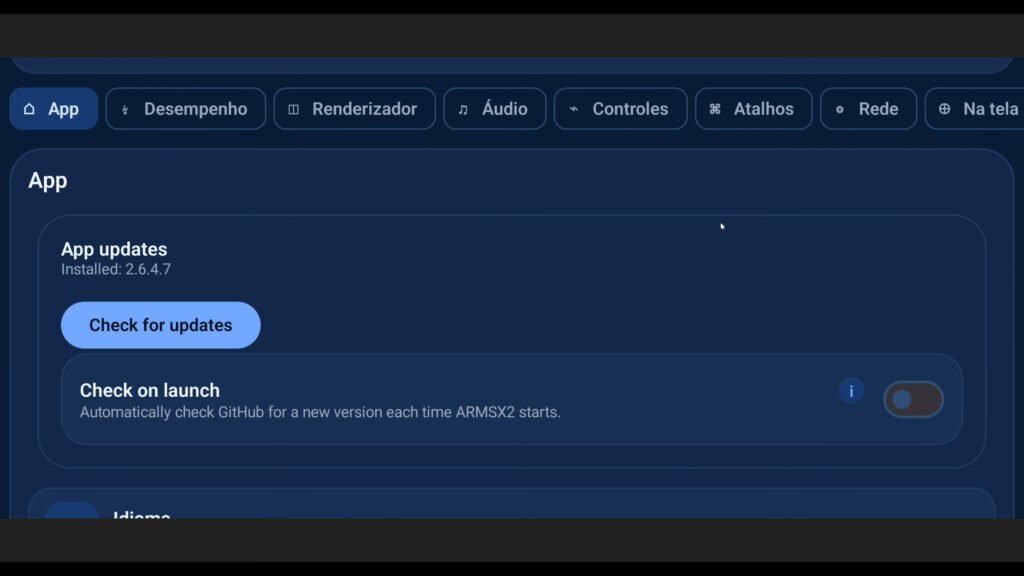
Inside the settings, you will need to scroll the screen down a bit. That is, swipe your finger until you find the section named
APPLICATION UPDATES. This is the area dedicated to managing your emulator's versions. After all, this is where all update options are concentrated.
3. Checking for New Versions
In this section, you have two main options to check for updates. First, you can check the box
CHECK ON STARTUP. With it enabled, the emulator will automatically notify you of new versions whenever you open it. However, for an immediate check, click on
CHECK FOR UPDATES. This will cause the application to search for a new version at that instant. Therefore, click on this option to proceed.
4. Downloading and Installing the Update
After checking, if a new update is found, the system will display a message. Therefore, click on
DOWNLOAD AND INSTALL to start the download. In addition, Android will ask for permission to install apps from unknown sources. Check
ALLOW FROM THIS SOURCE and click
ACCEPT to grant the necessary permission. Thus, the download will be completed.
5. Finalizing the Update
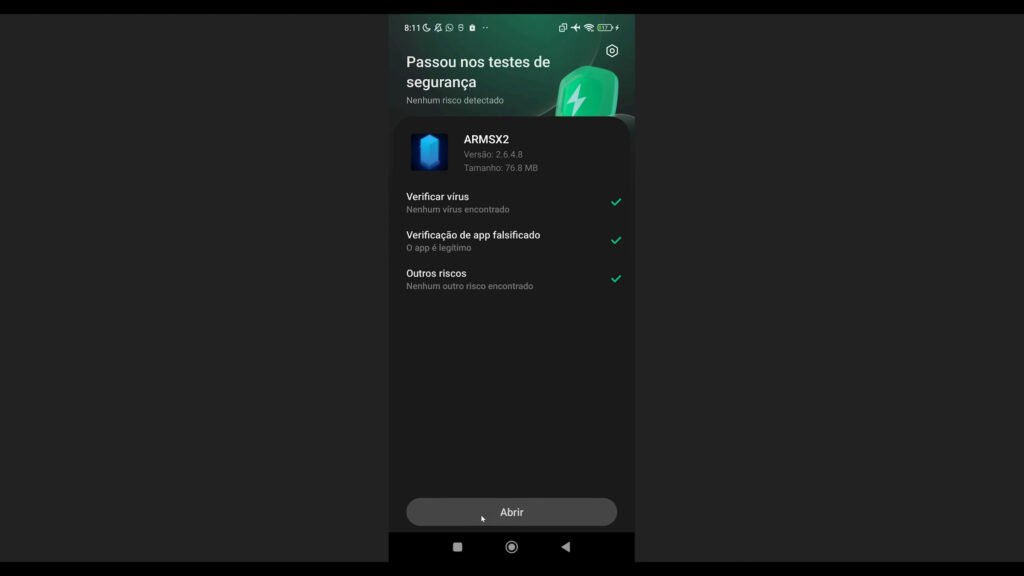
After downloading, click on
UPDATE and then on
OPEN to restart the emulator with the new version. However, it is crucial to follow these steps in order to avoid issues. Therefore, make sure that all steps have been completed. All set! You will have the latest version of ARMSX2 installed and ready to use. After all, keeping your emulator updated is essential to make the most of your PS2 games.
Why Keep Your ARMSX2 Emulator Updated?
Keeping ARMSX2 updated is more than just having the latest version; it's ensuring a superior emulation experience. Furthermore, updates often bring performance improvements, bug fixes, and new features that optimize gameplay. This auto-update feature, available since version 2.6.4.5, is a major differentiator.
Therefore, with version 2.6.4.7 or higher, you ensure access to the innovations. Thus, the inspiration from the
official PCSX2 website, considered the best PS2 emulator for PC, reflects ARMSX2's pursuit of excellence. Because of this, with each new release, your Android device will be better prepared to run PlayStation 2 classics. For more details about the
latest ARMSX2 updates, check out our dedicated article.
Conclusion: Advantages of Keeping ARMSX2 Up to Date
Updating your ARMSX2 emulator on Android is a simple step, but one with great benefits for your gaming sessions. After all, you ensure more stability, better performance, and expanded compatibility for your favorite games. However, this autonomy to update without relying on the Play Store is a major advantage. Therefore, always follow the recommendations to keep your app up to date.
Therefore, by following our guide, you ensure that you are getting the most out of your PS2 emulator. Furthermore, this regular maintenance is essential for anyone who wants to, for example,
play PS2 on iPhone with ARMSX2, since the foundation is the same. Therefore, do not hesitate to check and install the new versions for an unmatched gaming experience. Don't waste time and update right now!