GTA 2 in the browser is the proposal of the gta2-browser project, by M1sterMo, which adapts the 1999 classic to a computer tab. The documentation consulted on October 16, 2026, features widescreen, a map with markers, and multiplayer for up to six people. However, the network test log covers two players in tabs on the same Mac, not a match with six computers over the internet.
The project uses the community reconstruction of the original engine, called gta2_re, compiled to WebAssembly, with graphics in WebGL2. Thus, the browser runs the game on the computer itself. It is not a cloud gaming stream nor a recreation with the graphics of the more recent GTAs.
What changes in GTA 2 in the browser
First, the port expands the screen to 16:9 by default and allows other formats. In addition, the camera offers a modern mode that reduces zoom changes. Those who prefer the old presentation can select Classic. The minus and equal keys adjust the viewing distance.
The map, opened with M, shows explored areas, gang jobs, weapons, garages, and save points. It is also possible to click to set a destination. In turn, the circular radar brings this marker and gang indications to the game screen.
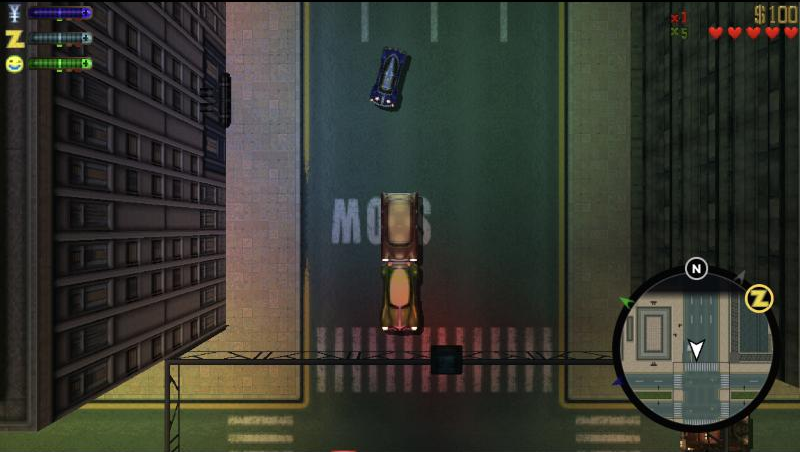
Capture of the project itself in Downtown, with widescreen and radar. Source: M1sterMo / gta2-browser; not a benchmark of Allves Games.
According to the README, the presentation can keep up with 60, 120, or 165 Hz monitors through interpolation. However, the logic remains at 30 cycles per second. Therefore, this feature smooths the image between simulation states; it does not turn the original game into a 165-cycle simulation.
GTA 2 multiplayer in the browser: test limits
The documentation offers three modes. In Free roam, participants explore a district, with friendly fire set by the host. Meanwhile Gang Wars divides players into teams connected to local gangs, with scoring based on accumulated money. Finally, Free-for-all uses individual matches with elimination or time limits.
In addition, teammates can get into the car as passengers, share destinations, talk with T, and open the scoreboard with Tab. However, passengers cannot shoot from the vehicle yet. A disconnected participant also cannot rejoin the same match.
The author registered two players in tabs on a Mac, featuring synchronization checks, team rules, and network transport tests. However, tests with more than two participants, distant computers, long sessions, and restrictive networks are still missing. Thus, the announced limit of six players does not equate to public validation of six people over the internet.
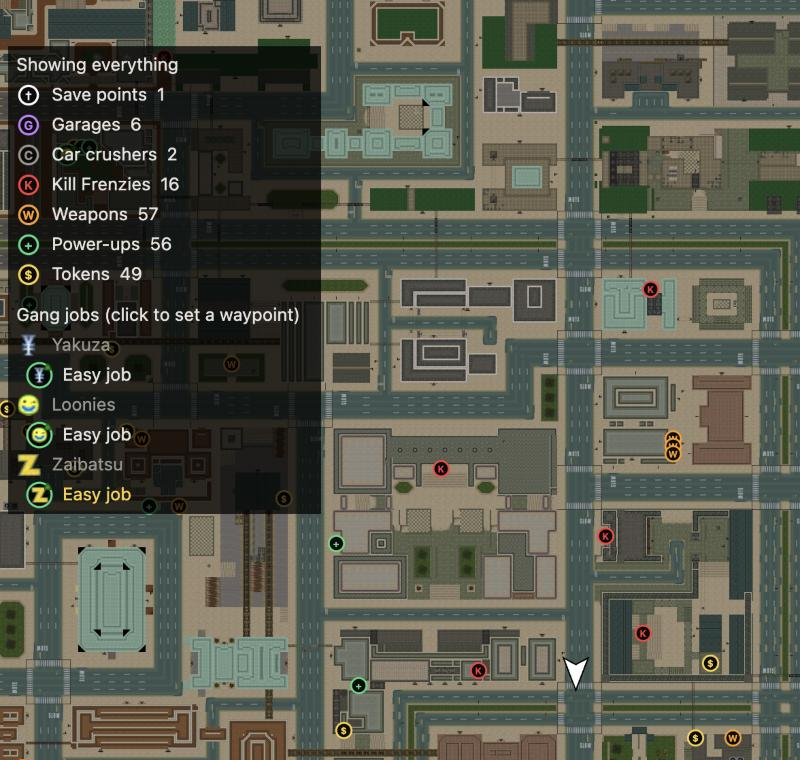
Map screen published by the developer, featuring markers and gang jobs. Source: M1sterMo / gta2-browser.
On the public website, browser-to-browser connection uses WebRTC. Because the match waits for participants' commands to advance, connection quality affects control responsiveness. Additionally, the author reports that restricted NAT networks may prevent connection, as the public page does not yet offer a TURN relay.
How to access the project and preserve saves
The developer announces support for desktop browsers Chrome, Edge, Firefox and Brave. On the other hand, Safari and mobile devices have not yet undergone the described tests. Therefore, the presence of a web address does not prove that the port works on Android or iPhone.
The public page indicated by the author responded to HTML's inquiry in this investigation. However, we did not run the game or download its data. The README states that the first use fetches about 346 MB of a version the maintainer identifies as the 2004 free edition, preserved on the Internet Archive.
Game files and local preparation
This is the workflow described by the project, not a confirmation of authorization to redistribute the files. The maintainer himself separates the port's code from the GTA 2 data and also offers a local path for the player's own copy.
- Consult the official README to choose between the public page and local preparation with your own files.
- If using the public page, the author indicates Play to start the first load. Wait for the preparation and check the screen and control options before the match.
- Then, preserve the site data in the browser. Saves are stored in this storage; use export before clearing data or switching profiles.
- For the network, choose Play with friends, enter a name and use Host a gameThe host chooses the mode, district, and limits; the others join via the room code or link.
- To build the local version, follow the build section of the README. It lists Python 3, Git, and Emscripten SDK 6.0.12; the development server accepts the folder of a custom GTA 2 installation.
The button below opens the code and the maintainer guide. Since the proposal is a web version, there is no Windows installer or APK to download here.
GTA 2 controls in the browser
During the game, WASD moves the character and drives vehicles. Enter gets in and out of cars; L shoots or strikes; and Space jumps or pulls the handbrake. Additionally, J and K switch weapons, while M opens the map. The menu Options → Controls allows you to rebind the keys.
At the same time, the historical elements remain those of the original game. The port adds presentation and networking features, but it does not offer a new official version from Rockstar. The image below records GTA 2 creation material and serves as historical context, not as a demonstration of the web adaptation.

GTA 2 conceptual art preserved by the Video Game History Foundation in its collection of DMA Design materials. Historical document; not a browser port capture.
To understand the scope of this type of adaptation, see our explanation about browser games and the limits of WebAssemblyEach project depends on its own code, compatibility, and data preparation.
Up to this review, we have not performed our own performance, mission, or multiplayer testing. Therefore, the features and limitations above follow the developer's README and network document, distinguishing between what is offered and what was actually recorded in tests.
Sources: gta2-browser README; multiplayer tests and limits; gta2_re project; Video Game History Foundation historical archive.