The Digimon World 2 for PC received a native port for Windows and Linux on October 9, 2026. For this, developer Wyrelade compiled recovered PlayStation 1 game code for current computers and added widescreen, visual improvements, and controller support. For now, the project remains in beta version.
The first public edition was 0.1.0. However, the author released successive fixes, and version 0.1.5, from October 10, already resolves an issue with items and healing skills in battles. The information is available in the official DW2-PC README and in the release history.
Digimon World 2 for PC uses recovered PS1 code
According to the creator, the port stems from the decompilation of Digimon World 2 itself. In this process, it reconstructs the game's 1,088 functions and provides the logic code that the PC compiles natively. In turn, an SDL3 layer replaces the original hardware interfaces. Therefore, it is neither a remake nor a generic emulator.
In addition, menus, battles, evolution, and enemy behavior preserve the old rules. Thus, the differences lie in the presentation, controls, and access to save files. This technique differs from other preservation works, such as the decompilation of Digimon World 3 and 2003, which deals with other games in the series.
Widescreen and scaling up to 8x change the graphics
At this point, the author implemented a 16:9 aspect ratio camera, polygon wobble correction, and scalable internal resolution. At 8x, the 3D drawing reaches 2560 × 1920 pixels; this does not correspond to 8K. On the other hand, the menus and 2D elements maintain the original presentation.
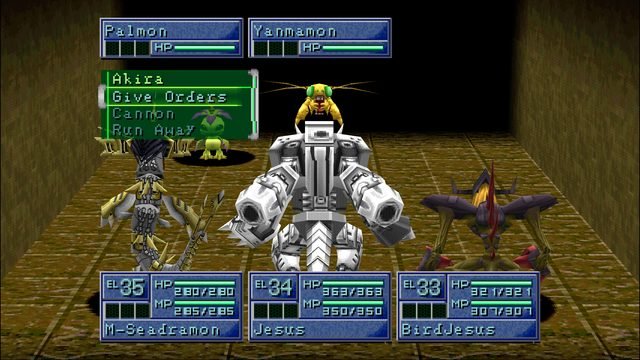
Battle in the DW2-PC port itself, in 16:9. Source: Wyrelade / GitHub.
In addition, the port offers GPU rendering with SDL_GPU/Vulkan and a software alternative. It also allows remapping keyboard and controllers, configuring fullscreen, and enabling sharpness filters. Therefore, the project images show real improvements from the port, but do not equate to a fully tested campaign.
Digimon World 2 for PC gets fixes in version 0.1.5
Initially, the 0.1.1 update added the F3 key to speed up execution between 2x and 8x, in addition to fixing Windows program details. Afterward, 0.1.2 fixed crashes in important item menus; 0.1.3 and 0.1.4 brought update checking and installation.
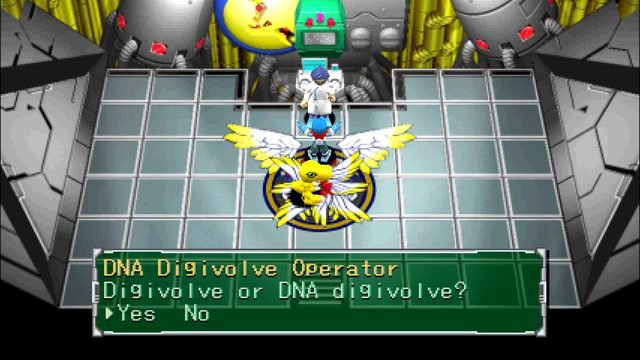
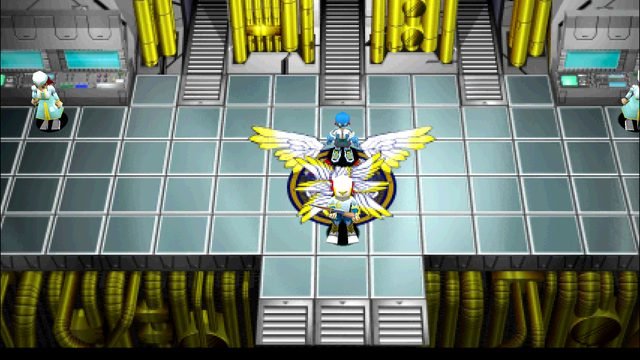
DigiLab in the native Digimon World 2 port. Source: Wyrelade / GitHub.
Finally, version 0.1.5 fixed the use of healing items and skills during battles. According to the changelog, these actions were being interpreted as attacks on PC. Even so, the developer does not state that the entire adventure was completed in independent testing.
How to prepare the Digimon World 2 port on Windows and Linux
To begin, you need a proper and legally acquired copy of Digimon World 2, North American edition SLUS-01193. In this case, the program accepts raw disc images with 2352-byte sectors, for example BIN/CUE, IMG, or raw ISO. Therefore, 2048-byte ISO files may lose audio and video tracks.
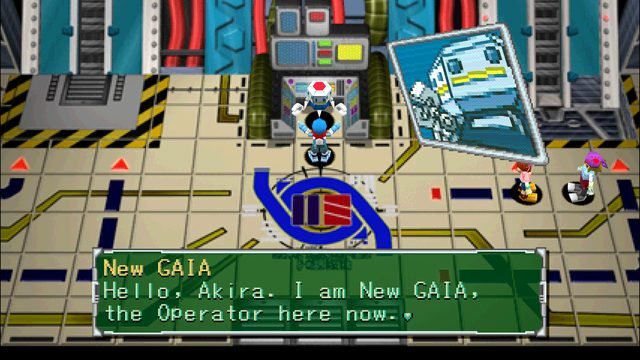
Main Gate area in the PC port itself. Source: Wyrelade / GitHub.
- Make a backup of your saves and check if the disc is from the USA edition accepted by the port.
- Download the latest Windows x64 package of DW2-PC from the button below.
DOWNLOAD UPDATED DIGIMON WORLD 2 PORT WINDOWS
- Extract the ZIP and place your original game image in the same folder as the executable.
- Run
dw2.exe. On first launch, the port checks the files and creates the data packagedw2.paklocally. - Open settings with F1 to adjust widescreen, controls, and resolution. The F3 key toggles speed.
Linux x64: there is an official ZIP, but the site's friendly Linux route still depends on a technical fix. Therefore, this draft does not feature a Linux button until the route is validated. The Linux version requires SDL3 3.4 or higher and glibc 2.43 or higher, according to the project's documentation.
Limitations and next steps
According to the README, the port reproduces battles, scenarios, and save features, based on the author's reports and screenshots. However, no independent testing of the entire campaign was presented in this article. Even so, certain menus and situations may reveal errors, especially after the various fixes of the beta phase.
For comparison with other classic game native port initiatives, see also the 2Xtreme preview on Mac, which is a distinct project.
Sources: Wyrelade repository and README; port releases; decompilation code.